



Kitchen screens, station by station
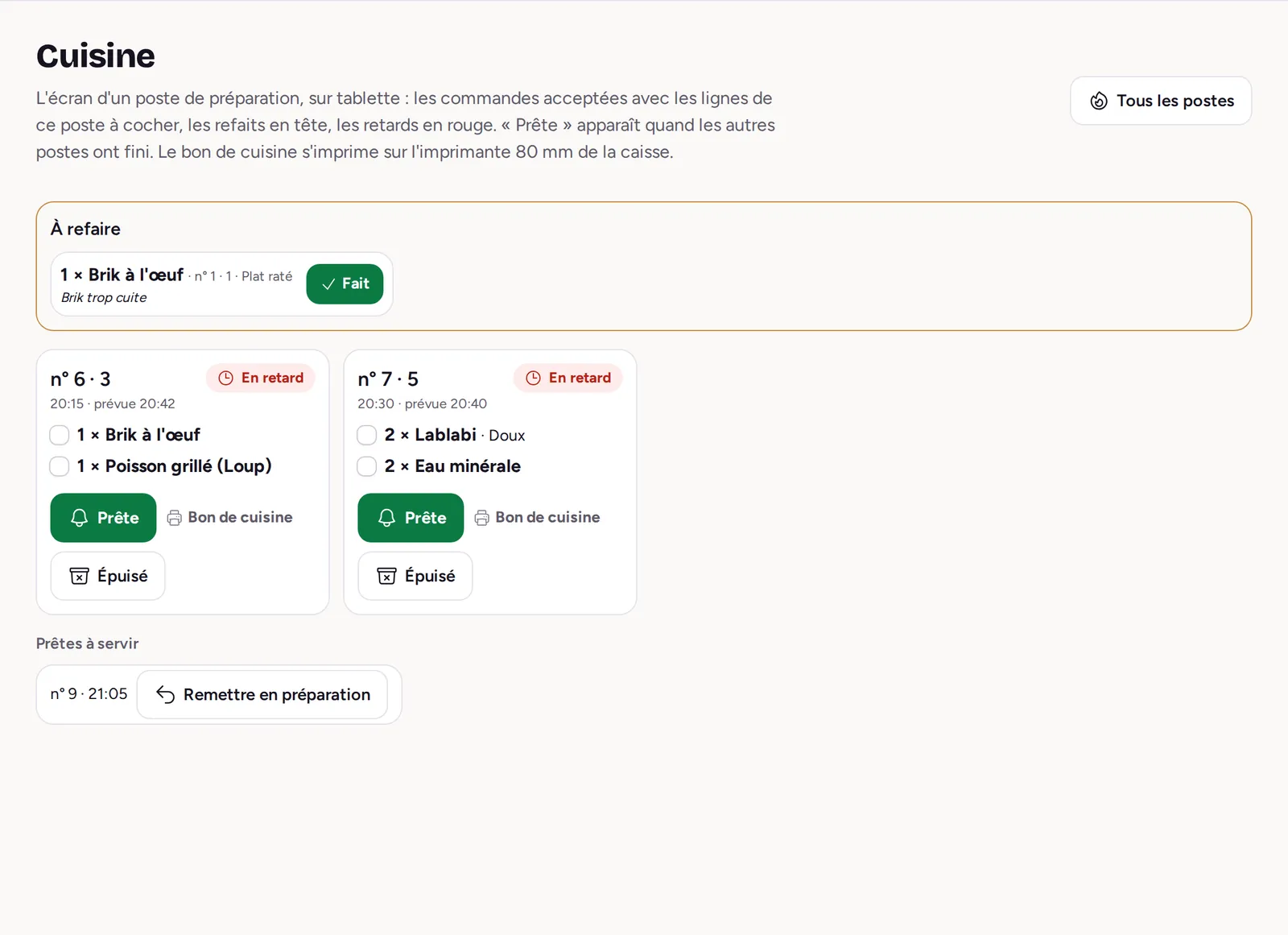
Each station (kitchen, grill, bar, oven) sees on its tablet the lines that concern it and ticks them off as it goes. The floor knows when it is ready.
How it works
-
1
The order arrives
Accepted or sent from the till, it shows at its dishes’ stations, with a sound.
-
2
The station ticks its lines
The first tick puts the order in preparation; an order late on its announced time is red.
-
3
The floor is told
When every station is done, the order is ready: the floor serves it.
A kitchen that keeps up
-
“Live”
New, in the kitchen, ready to serve: every order in three columns, urgent ones first.
-
Each cook at their station
A cook assigned to stations sees and hears only their orders.
-
Remakes
A botched or returned dish is remade with its reason; it counts as a loss, not a sale.
-
One alert, one sound
New order, call, dish ready, late: each alert has its sound, muted with one click.
Frequently asked questions
Do I need a special screen?
No. The kitchen screen is designed for a tablet and works in any recent browser.
What if I prefer paper?
The kitchen ticket prints on the 80 mm printer, when sent or from the station’s screen.
An order marked ready by mistake?
It goes back into preparation from the screen, as long as it has not been served.