


A menu in French, Arabic and English
Your local guests, tourists and expatriates read the same menu, each in their own language: their phone’s, among your menu’s languages.
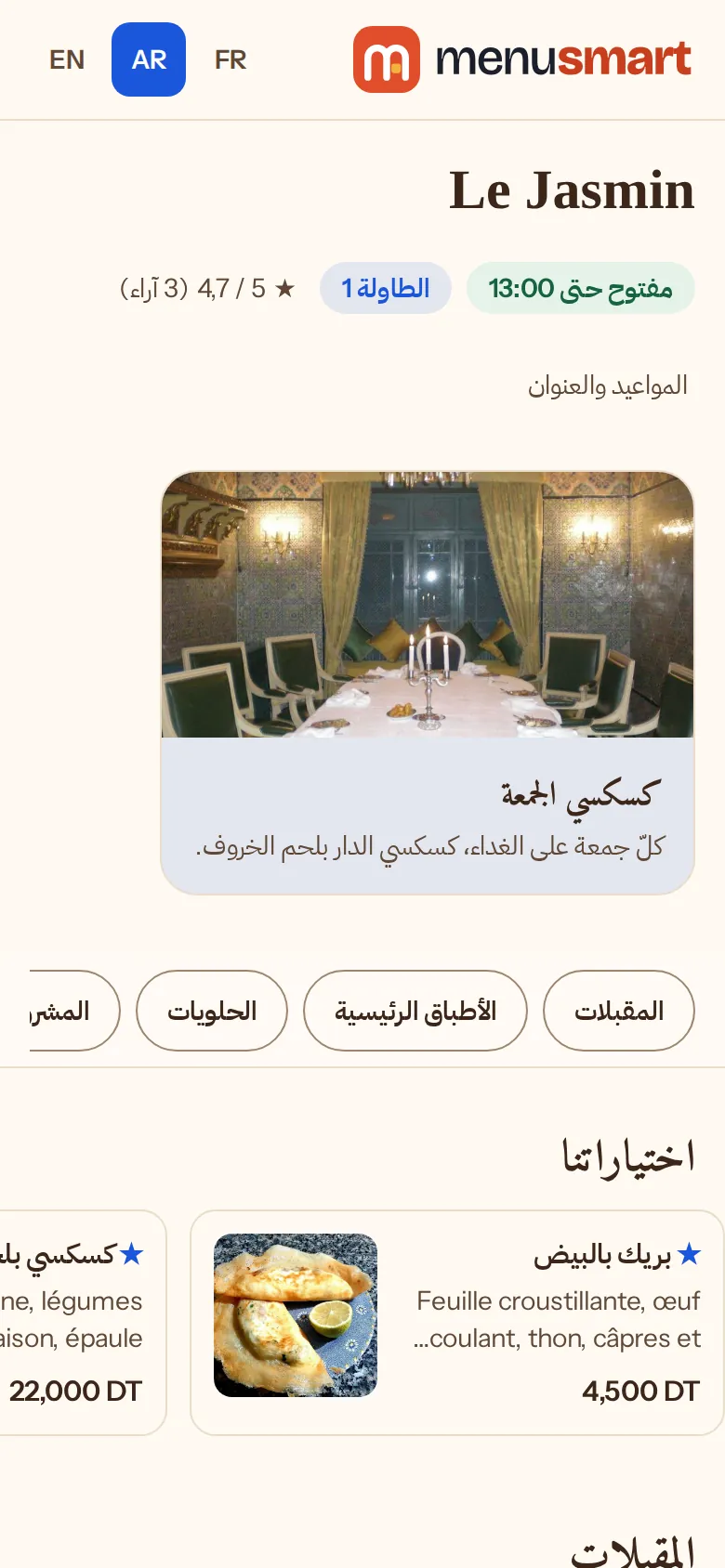
How it works
-
1
Choose your languages
French, Arabic, English: the first is the main language, the one you write the menu in.
-
2
Translate on one screen
“Translate the menu” lists every text not yet translated: menus, sections, dishes, options, banners.
-
3
Guests read in their language
The menu opens in their phone’s language; an untranslated text stays in the main language.
Translated once, right everywhere
-
Three languages
Each dish’s name and description, in every language of the menu.
-
Allergens already translated
The 14 allergens come in French, Arabic and English.
-
Translated posters
The text of the tables’ QR posters is written in the menu’s languages.
-
Nothing forgotten
A field left empty stays on the list to translate: you see what is missing, language by language.
Frequently asked questions
Are translations automatic?
No: you write them, or have them written, on the “Translate the menu” screen, which gathers everything missing.
Can I have only French and Arabic?
Yes. You choose the menu’s languages in the restaurant settings.
Do prices change with the language?
No. The price always comes from the menu, the same in every language.